Audit Logs
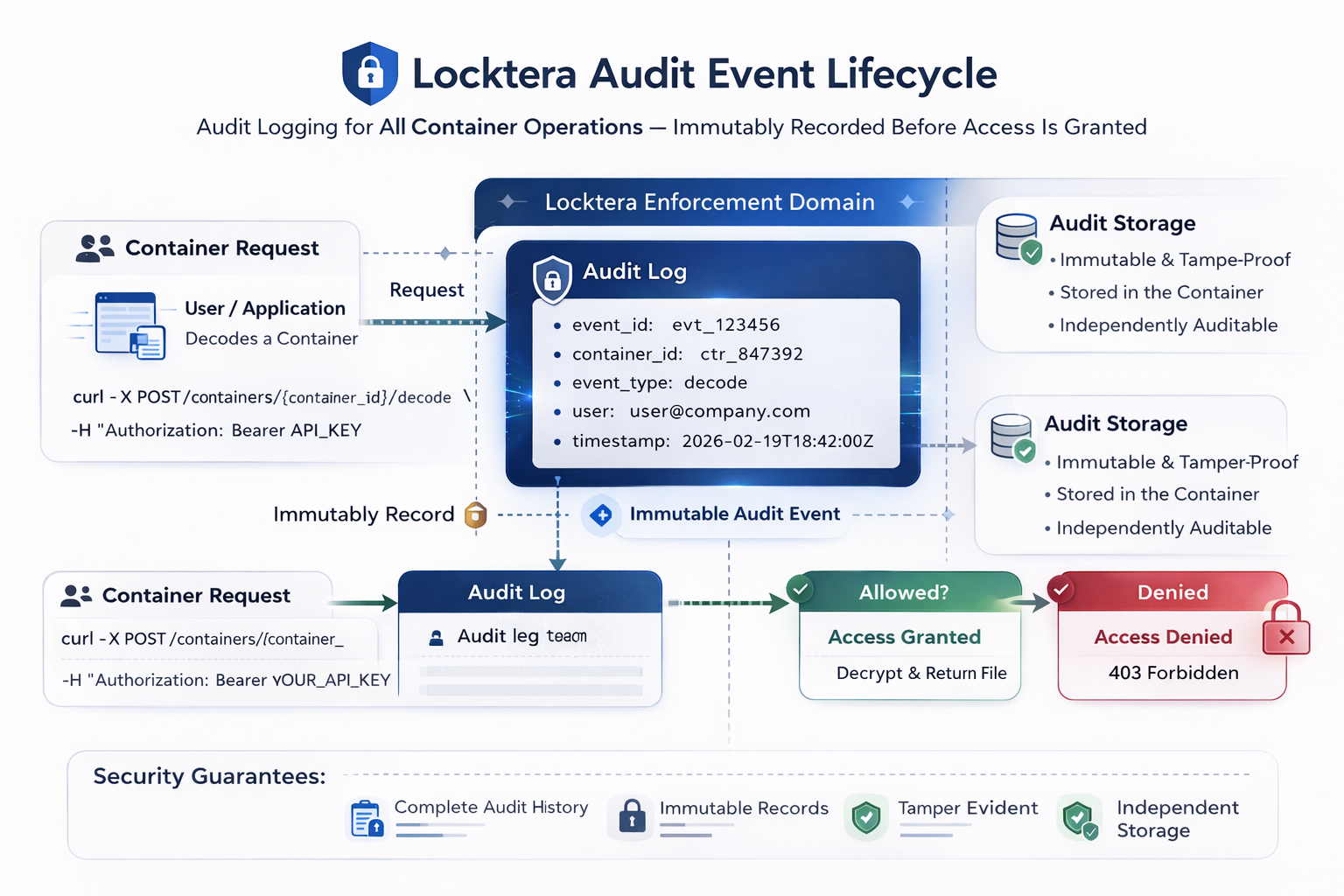
Locktera records audit events for all container operations. Audit metadata is cryptographically associated with the container, ensuring audit records remain reliable and verifiable.
Audit logs provide a complete record of access attempts, including successful access and denied access. These logs support compliance, monitoring, and forensic analysis.
Audit logging is automatic and cannot be disabled. Audit events are generated before access is granted or denied, ensuring a complete and reliable record of all access attempts.
What Is Logged
Locktera records audit events for operations such as:
• Container creation
• Container access attempts
• Successful container decoding
• Denied access attempts
• Access policy changes
• Container deletion
Each audit event is associated with a specific container_id.
Audit Event Data
Audit events include information such as:
• Container ID
• User identity
• Timestamp
• Operation performed
• Access result (allowed or denied)
• Request origin (IP address, when available)
Example audit event:
{
    "id": "123e4567-e89b-12d3-a456-426614174002",
    "org_id": "123e4567-e89b-12d3-a456-426614174000",
    "container_id": "123e4567-e89b-12d3-a456-426614174001",
    "creator_ip": "192.168.0.1",
    "user": "jane.doe@example.com",
    "created_date": "2026-01-01T15:00:00.000Z",
    "action": "container.load"
}Example denied access event:
{
    "id": "123e4567-e89b-12d3-a456-426614174002",
    "org_id": "123e4567-e89b-12d3-a456-426614174000",
    "container_id": "123e4567-e89b-12d3-a456-426614174001",
    "creator_ip": "192.168.0.127",
    "user": "john.doe@example.com",
    "created_date": "2026-01-02T15:00:00.000Z",
    "action": "drm.fail"
}Common event_type values include:
• container.create
• container.load
• object.load
• drm.fail
• container.changeDrm
Retrieving Audit Logs
Audit logs can be retrieved using the audit endpoint:
GET /users/{user_id}/containers/{container_id}/eventsExample request:
curl -X GET $BASE_URL/users/YOUR_USER_ID/containers/CONTAINER_ID/events \
-H "Authorization: Bearer YOUR_API_KEY"Example response:
[
  {
    "id": "123e4567-e89b-12d3-a456-426614174002",
    "action": "container.create",
    "user": "user@company.com",
    "timestamp": "2026-02-19T18:42:00Z"
  },
  {
    "event_id": "123e4567-e89b-12d3-a456-426614174003",
    "event_type": "drm.fail",
    "user": "unauthorized.user@company.com"
    "timestamp": "2026-02-19T18:45:00Z"
  }
]When Audit Events Are Created
An audit event is created whenever:
• A container is created
• A container is accessed
• A container decode is attempted
• Access is denied
• Access policies are modified
• A container is deleted
Audit events are created regardless of whether access is allowed or denied.
Audit Log Security
Audit logs are protected and cannot be modified through the API.
They provide a reliable record of container activity. Audit events are append-only and cannot be modified or deleted.
Audit logs can be used for:
• Compliance reporting
• Security monitoring
• Incident investigation
• Access verification
Summary
Audit logs provide a complete record of container activity.
They record:
• Who accessed a container
• When access occurred
• What action was performed
• Whether access was allowed or denied
Audit logs enable monitoring, compliance, and forensic analysis of container access.
