Containers
A container is Locktera’s secure file object.
When files are encoded using the Locktera API, they are encrypted and packaged into a container. The container enforces access control policies cryptographically and records audit events for all access attempts.
Containers use the .tera file format and remain protected regardless of where they are stored, transferred, or shared.
Containers are the primary object used to securely store, access, and manage protected files in Locktera.
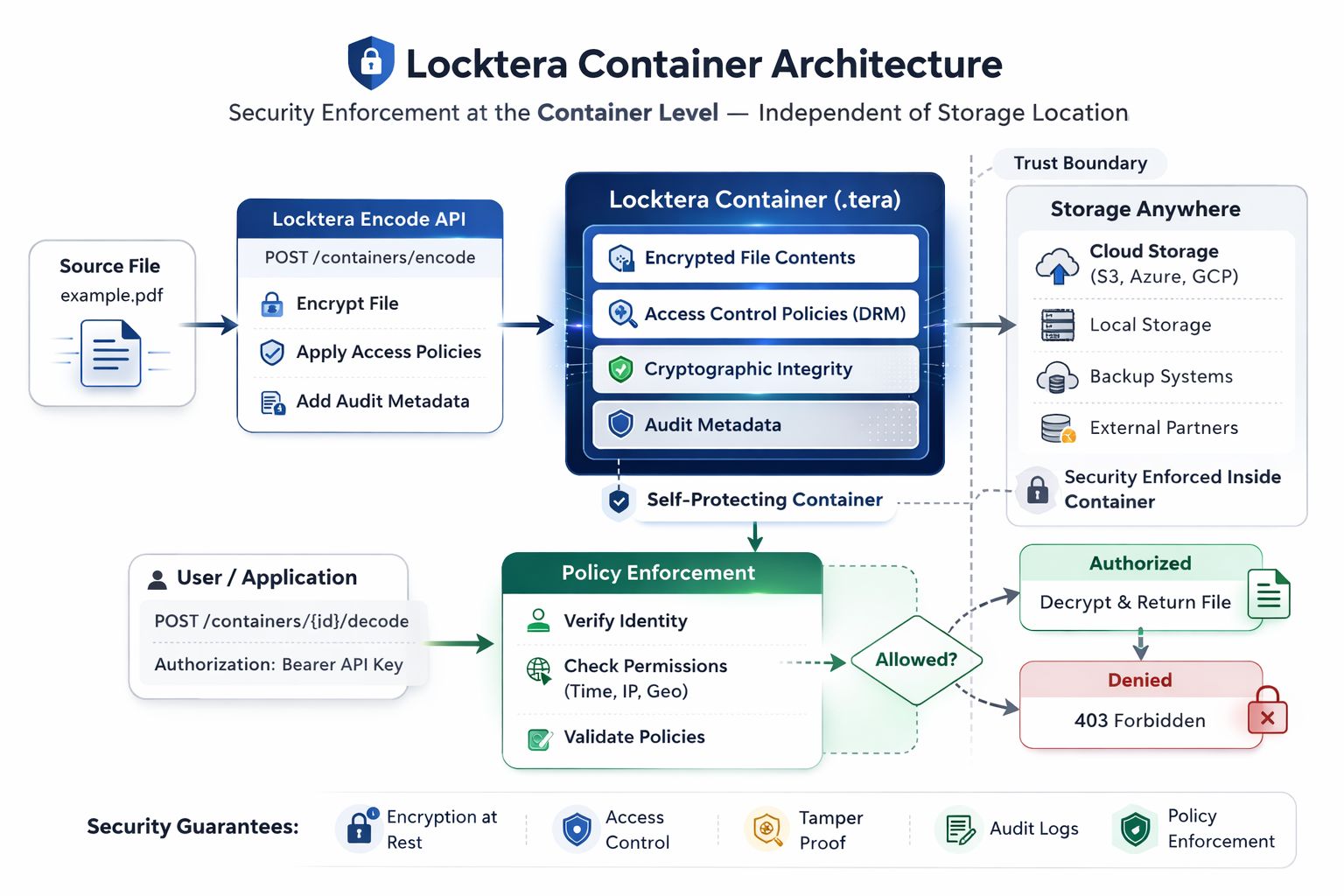
What a Container Contains
Each container includes:
• Encrypted file contents
• Access control policies (DRM rules)
• Cryptographic integrity protection
• Audit logging metadata
Containers are self-protecting. Access policies and encryption remain enforced independently of storage location or infrastructure.
Container ID
Each container is assigned a unique identifier called the container_id.
container_idExample:
123e4567-e89b-12d3-a456-426614174000The container_id is used to perform all container operations, including:
• Retrieving container metadata
• Updating access policies
• Decoding container contents
• Retrieving audit logs
• Deleting containers
Container Lifecycle
The typical lifecycle of a container is:
• Files are encoded into a container
• Access policies are applied using a manifest
• The container is stored or shared
• Authorized users decode the container
• Audit logs record all access attempts
Containers remain encrypted at rest and during transfer.
Container Immutability
Container contents are cryptographically signed.
If encrypted contents are modified, the signature becomes invalid and access is denied.
This ensures:
• Data integrity
• Tamper detection
• Cryptographic verification of contents
Access policies may be updated after creation if the container was created with:
"dynamic": trueFile contents themselves cannot be modified.
Creating a Container
Containers are created using the encode endpoint:
POST /users/{user_id}/containers/encodeExample:
curl -X POST $BASE_URL/users/YOUR_USER_ID/containers/encode \
  -H "Authorization: Bearer YOUR_API_KEY" \
  -F "manifest.json=@manifest.json;type=application/json" \
-F "files=@example.pdf;type=application/pdf"Example response:
{
  "container": {
    "uuid": "123e4567-e89b-12d3-a456-426614174000"
    // ...
  }
}The returned container_id uniquely identifies the container.
Retrieving Container Metadata
Retrieve container information:
GET /users/{user_id}/containers/{container_id}Example:
curl -X GET $BASE_URL/users/YOUR_USER_ID/containers/CONTAINER_ID \
-H "Authorization: Bearer YOUR_API_KEY"Example response:
{
  "container": {
    "uuid": "123e4567-e89b-12d3-a456-426614174000"
    // ...
  }
}This endpoint returns metadata only. Encrypted file contents are not returned.
Deleting a Container
Delete a container:
DELETE /users/{user_id}/containers/{container_id}After deletion, the container can no longer be accessed or decrypted. This action is permanent.
Security Properties
Containers provide:
• File-level encryption
• Cryptographic access enforcement
• Tamper detection and integrity validation
• Access revocation (when dynamic DRM is enabled)
• Complete audit tracking
All access attempts are evaluated against the container’s access policies.
Unauthorized access attempts return:
403 ForbiddenRelationship to Manifest and DRM
Access policies are initially defined in the manifest during encoding.
If dynamic access control is enabled, policies may be updated using:
PATCH /users/{user_id}/containers/{container_id}/drmSee Core Concepts → Manifest for access policy details.
Container Storage Model
Containers may be stored in any storage system, including:
• Cloud storage (AWS S3, Azure Blob, GCP Storage)
• Local file systems
• Backup and archive systems
• External partner systems
Container security remains enforced regardless of storage location.
Summary
A container is:
• An encrypted file object
• Identified by a unique container_id
• Cryptographically protected and tamper-evident
• Controlled by access policies
• Fully auditable
All secure file operations in Locktera are performed on containers.
