How to Secure RAG Workflows Using Locktera
This guide shows how to secure Retrieval-Augmented Generation (RAG) applications using Locktera encrypted containers with cryptographically enforced access control.
Traditional RAG architectures rely on infrastructure permissions and application logic to restrict access to sensitive documents. These controls cannot reliably prevent unauthorized access if the index, storage, or pipeline infrastructure is compromised.
Locktera secures AI workflows by encrypting each document into an immutable container and enforcing access policies cryptographically at the time of decryption. The AI system can only access documents the requesting user is explicitly authorized to view. Authorization is evaluated independently of the index, storage layer, or application logic.
That makes it crystal clear that this is not middleware security — it’s cryptographic enforcement. This ensures sensitive data remains protected throughout ingestion, indexing, retrieval, and model inference.
Insecure Workflow
In a traditional RAG system, documents are stored in plaintext or accessible storage and retrieved directly by the model.
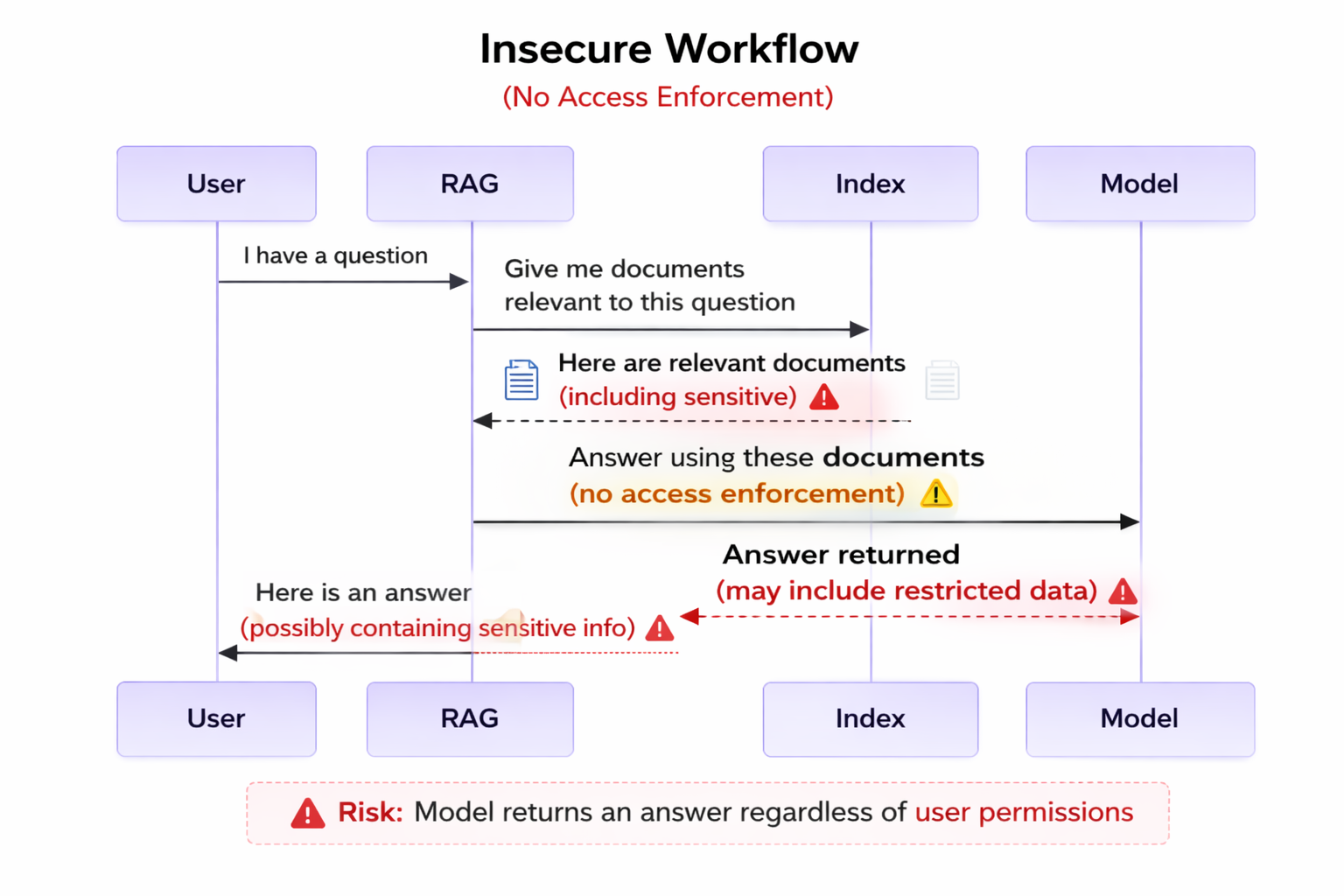
Workflow:
-
User submits a question
-
RAG system queries the index
-
Index returns relevant documents
-
Model generates a response using those documents
Sensitive documents may be retrieved and used by the model regardless of user-level authorization.
Concerns
Traditional RAG systems introduce several security risks:
• The index may expose sensitive documents if compromised
• The model may generate responses containing restricted information
• Access control depends on infrastructure and application logic
• Documents remain accessible if copied or improperly secured
• There is no cryptographic enforcement of access policies
• Access events may not be fully auditable
Sensitive information may be exposed without detection or prevention.
Secured Workflow
Locktera secures RAG applications by encrypting documents into containers and enforcing access cryptographically.
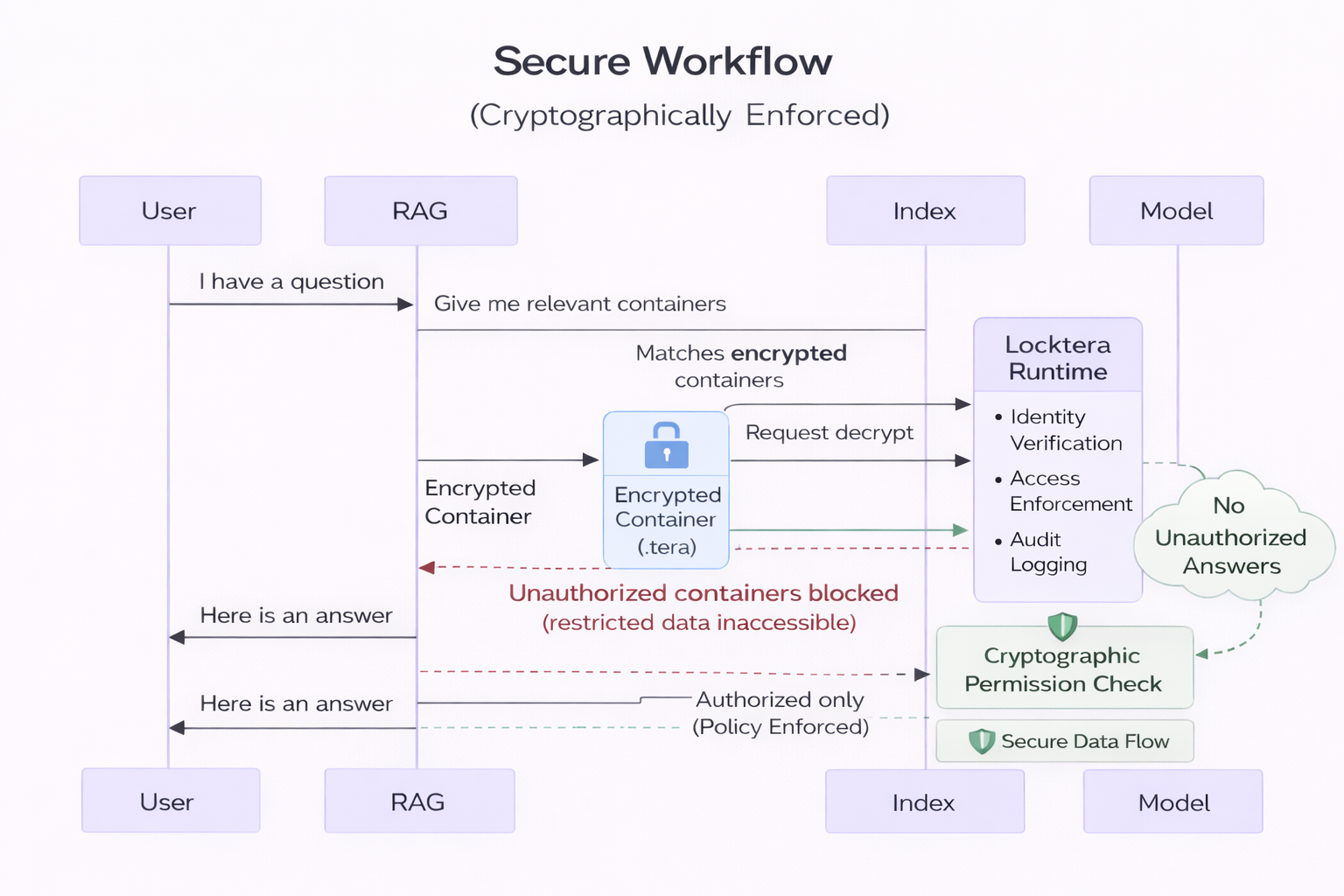
Workflow:
-
Documents are encrypted into Locktera containers
-
The index stores only container IDs and metadata
-
User submits a question
-
RAG system retrieves relevant container IDs
-
Locktera verifies the authenticated user identity and evaluates container access policies before permitting decryption
-
Authorized containers are decrypted
-
Unauthorized containers remain encrypted and inaccessible
-
Model generates a response using only authorized data
Access enforcement occurs cryptographically at decryption.
Improvements
Locktera provides several critical security improvements:
• Only container IDs are stored in the index
• Sensitive documents remain encrypted at all times
• Unauthorized users cannot decrypt protected documents
• Access policies are enforced independently of infrastructure
• Unauthorized access attempts are automatically blocked
• All document access generates an audit record
• Access may be revoked at any time
This prevents unauthorized access even if infrastructure is compromised.
Implementation
Locktera integrates directly into existing RAG pipelines.
To accurately record access by an agent/RAG pipeline on behalf of a user, all decryption operations should be performed with a user and API key that represents the agent/RAG pipeline.
Access logs will then indicate that the agent accessed documents on behalf of the actual user.
Step 1 — Encrypt Documents During Ingestion
Encode each document into a Locktera container.
curl -X POST $BASE_URL/users/USER_ID/containers/encode \
  -H "Authorization: Bearer YOUR_API_KEY" \
  -F "manifest.json=@manifest.json;type=application/json" \
  -F "name=AI Document Container" \
-F "file=@document.pdf"Response:
{
  "org_id": "YOUR_USER_ID",
  "container": {
    "uuid": "123e4567-e89b-12d3-a456-426614174000",
    "name": "AI Document Container"
    "created_at": "2026-02-21T18:35:17Z"
  }
}Store the container_id with your document metadata.
Step 2 — Store Container IDs in the Index
During indexing, associate each embedding with its container ID.
Example index record:
{
  "embedding": [...],
  "container_id": "123e4567-e89b-12d3-a456-426614174000"
}The index stores only embeddings and container UUIDs. Plaintext document contents are never stored in the index.
Step 3 — Manage Document Access Policies
Grant access to authorized users.
curl -X PATCH $BASE_URL/users/USER_ID/containers/CONTAINER_ID/drm \
  -H "Authorization: Bearer YOUR_API_KEY" \
  -H "Content-Type: application/json" \
  -d '{
    "recipients": [
      "authorized.user@company.com"
    ]
}'Access policies are enforced cryptographically.
Step 4 — Retrieve and Decrypt Authorized Documents
After identifying relevant container IDs, attempt to decrypt them.
curl -X GET $BASE_URL/users/USER_ID/containers/CONTAINER_ID/decode \
-H "Authorization: Bearer USER_API_KEY"Response (authorized):
{
  "org_id": "YOUR_USER_ID",
  "container": {
    "uuid": "123e4567-e89b-12d3-a456-426614174000",
    "files": [
      {
        "name": "document.pdf"
      }
    ]
  }
}Response (unauthorized):
{
  "error": "access_denied",
  "message": "Decryption is not permitted for this container."
}Unauthorized containers remain encrypted.
Exclude unauthorized containers from the model context.
Step 5 — Generate Model Response Using Authorized Content
Pass only authorized documents to the model.
The model never receives unauthorized or restricted data.
Step 6 — Audit Document Access
Retrieve audit records:
curl -X GET $BASE_URL/users/USER_ID/containers/CONTAINER_ID/events \
-H "Authorization: Bearer YOUR_API_KEY"Audit logs provide verifiable access history.
Security Properties
This architecture ensures:
• Documents remain encrypted at all times
• Access is enforced cryptographically
• Unauthorized users cannot access sensitive data
• Infrastructure compromise does not expose documents
• Models cannot use unauthorized information
• Access may be revoked at any time
• All access events are audit logged
• Document integrity and authenticity are verified
Common Use Cases
Locktera secures AI workflows including:
• Enterprise AI assistants
• Secure knowledge base systems
• Customer support AI systems
• Legal and healthcare AI systems
• Financial data AI applications
• AI model training pipelines
Summary
Locktera enables secure AI and RAG applications by encrypting documents into immutable containers and enforcing access cryptographically at the time of decryption.
Only authorized users and systems may access protected documents. Unauthorized access is automatically blocked, and all access is audit logged.
This ensures sensitive data remains protected throughout AI ingestion, retrieval, and inference workflows.
